 Burton
01 Product Positioning
ASN manages advance shipment notices, transportation details, trade documents, and receiving preparation before goods arrive at the warehouse. It centralizes shipment, bill of lading, container, ETA, document completeness, POD, and duty information to prepare WMS receiving and inventory workflows.
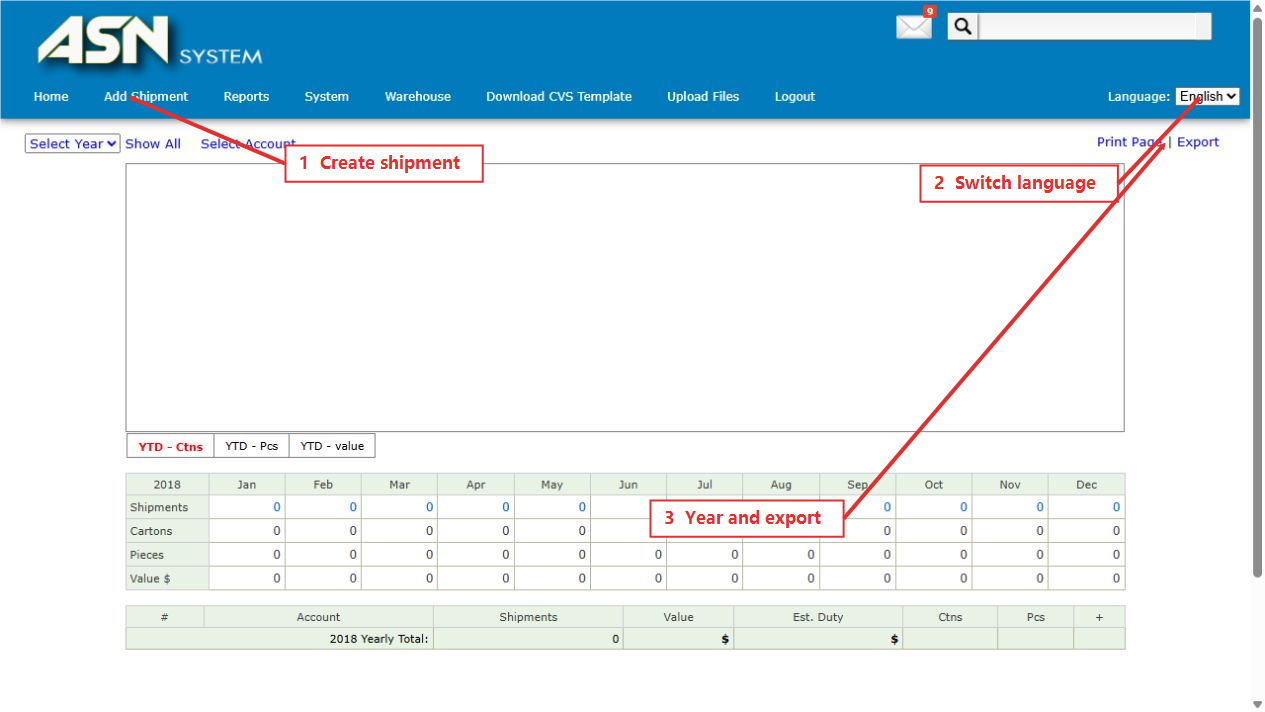
02 Home Page Structure
| Area | Purpose |
|---|---|
| Home | Review annual shipments, cartons, pieces, value, and estimated duty. |
| Add Shipment | Create an ASN shipment and maintain bill, container, and transportation details. |
| Reports | Review open shipments, missing POD, and related reports. |
| System | Update duty and upload arrival notices, POD, CSV files, and audit information. |
| Warehouse | Open WMS inventory, inbound, outbound, and accounting workspaces. |
03 Recommended Sequence
- Confirm the year, language, and account scope after login.
- Use Add Shipment for the master bill, containers, ETA, and delivery location.
- Add CSV, invoices, packing lists, bills of lading, ISF, and manifests through the upload workflow.
- Use Reports to check open shipments, missing files, and POD status.
- Hand confirmed ASN information to WMS Inbound for warehouse execution.
04 Language
The portal supports English and Chinese. Menus, field labels, report headers, and prompts change with the selected language. Customer names, shipment references, and platform terms may remain in their source language.